
Why Does 0.1 + 0.2 Equal 0.30000000000000004? Floating-Point Errors Explained
Understand why computers produce floating-point precision errors, how the IEEE 754 standard stores decimal numbers in binary, why rounding occurs, and the best practices developers use to write accurate, reliable code.

If you’ve ever typed 0.1 + 0.2 into a programming language console, you’ve probably expected the answer to be 0.3.
Instead, you may have seen:
0.30000000000000004
At first glance, it looks like the programming language made a mistake.
It didn’t.
This behavior exists in JavaScript, Python, Java, C++, C#, Go, Rust, and almost every modern programming language. The reason isn’t a software bug—it’s the way computers store decimal numbers internally.
Once you understand how floating-point numbers work, this “weird” result becomes completely logical.
Try It Yourself
Open any console and run:
0.1 + 0.2
Output:
0.30000000000000004
Now try:
0.1 + 0.2 === 0.3
Output:
false
Surprising? Absolutely.
Let’s see why it happens.
Computers Think in Binary, Not Decimal
Humans naturally use the decimal (base-10) number system.
Computers use binary (base-2) because electronic circuits only need two states:
- 0 (off)
- 1 (on)
Whole numbers are easy to represent in binary.
For example:
| Decimal | Binary |
|---|---|
| 1 | 1 |
| 2 | 10 |
| 3 | 11 |
| 4 | 100 |
The real challenge begins when we store fractions.
Some Decimal Fractions Never End in Binary
You’ve probably seen repeating decimals before.
For example:
1 ÷ 3 = 0.333333333...
The number never ends.
Exactly the same thing happens in binary.
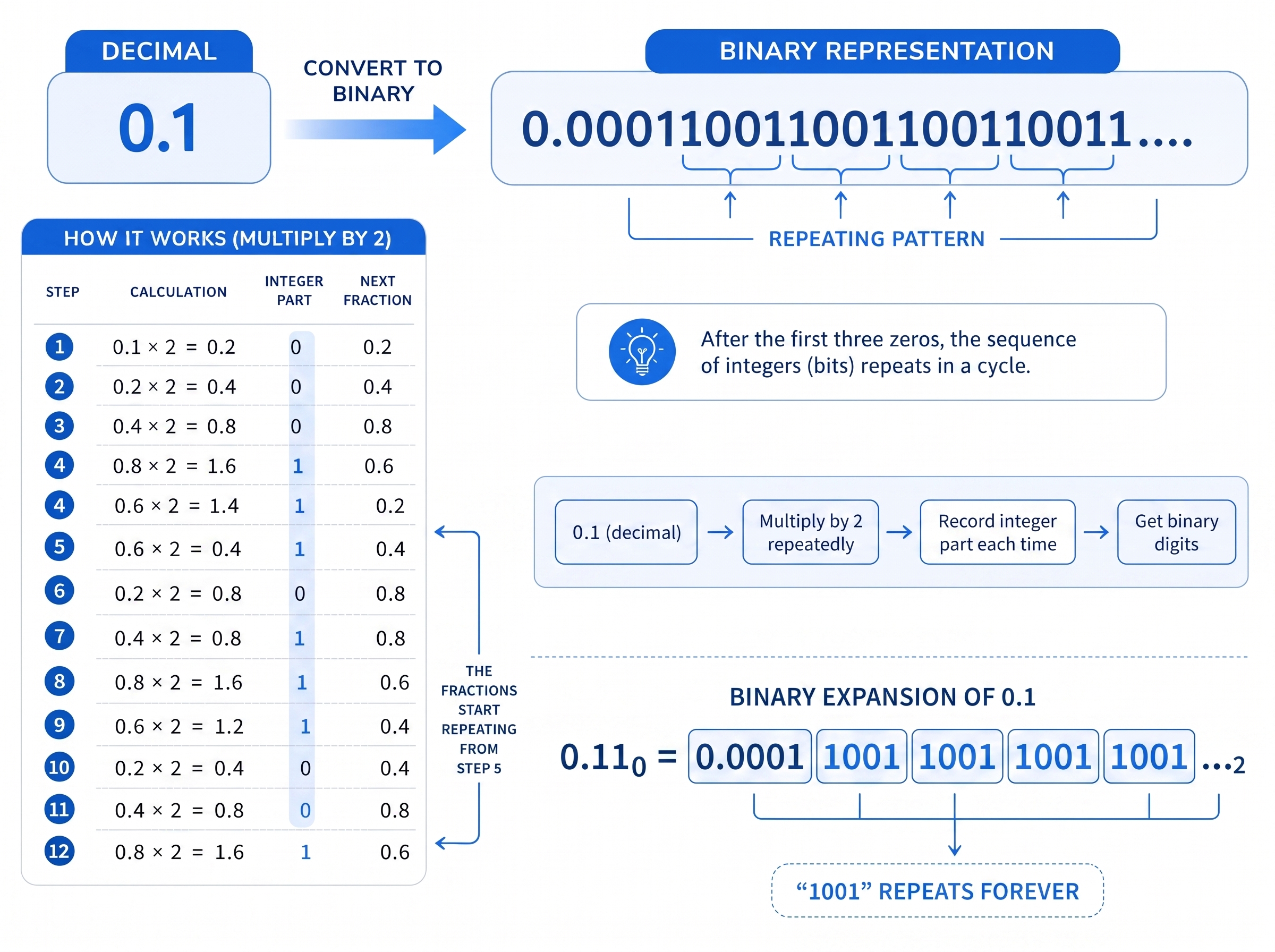
The decimal value 0.1 becomes:
0.000110011001100110011...
The pattern 0011 repeats forever.
Likewise,
0.2
becomes
0.00110011001100110011...
These numbers have an infinite binary representation.
A computer obviously can’t store an infinite number of digits.
So it stores the closest possible approximation.
Where the Tiny Error Comes From
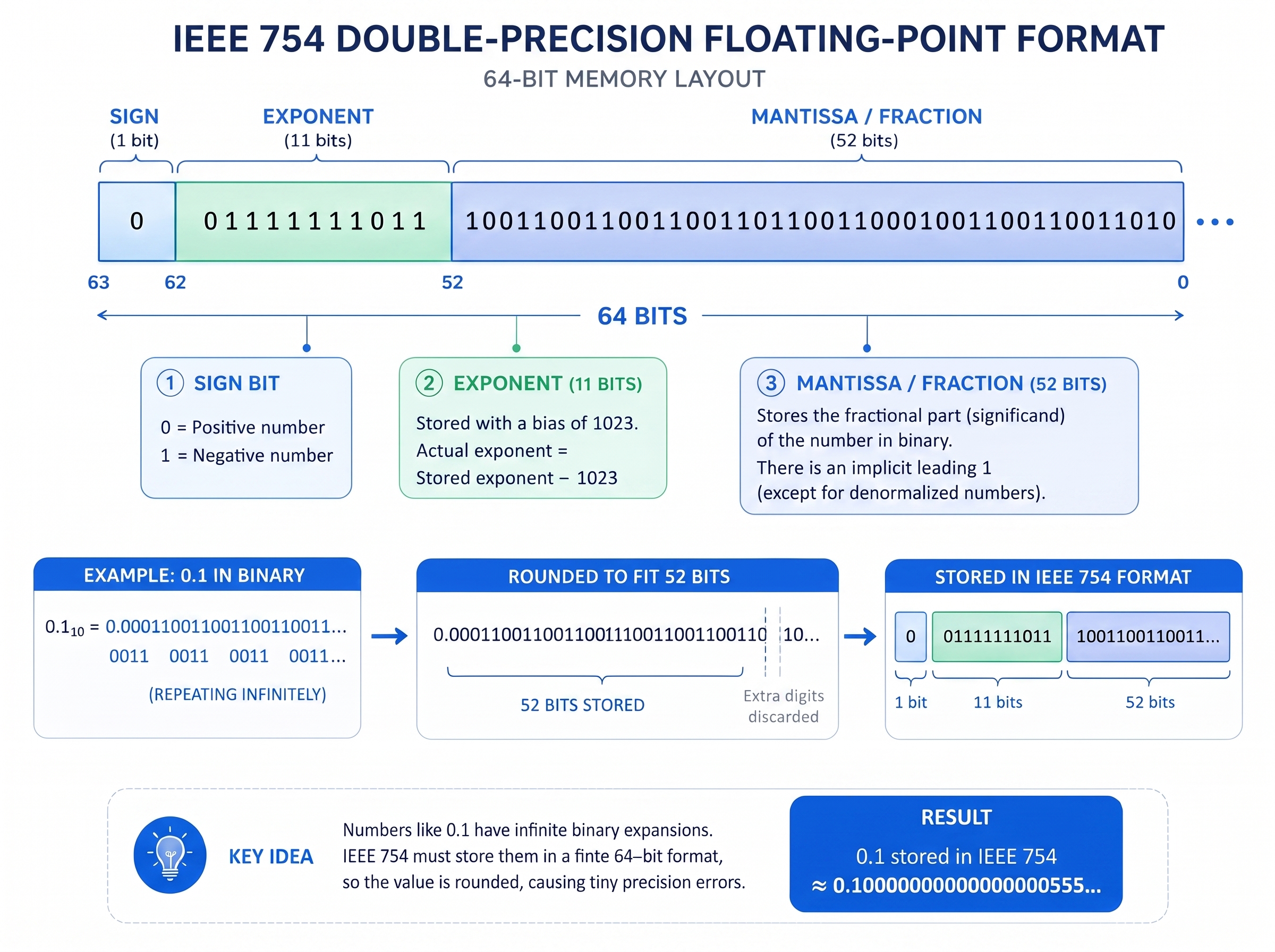
Most programming languages use the IEEE 754 double-precision floating-point format.
A double has only 64 bits available.
That means the endless binary digits for 0.1 must eventually be cut off and rounded.
The actual stored value isn’t exactly 0.1.
It’s approximately:
0.1000000000000000055511151231257827021181583404541015625
That’s incredibly close to 0.1.
But it’s not exactly equal.
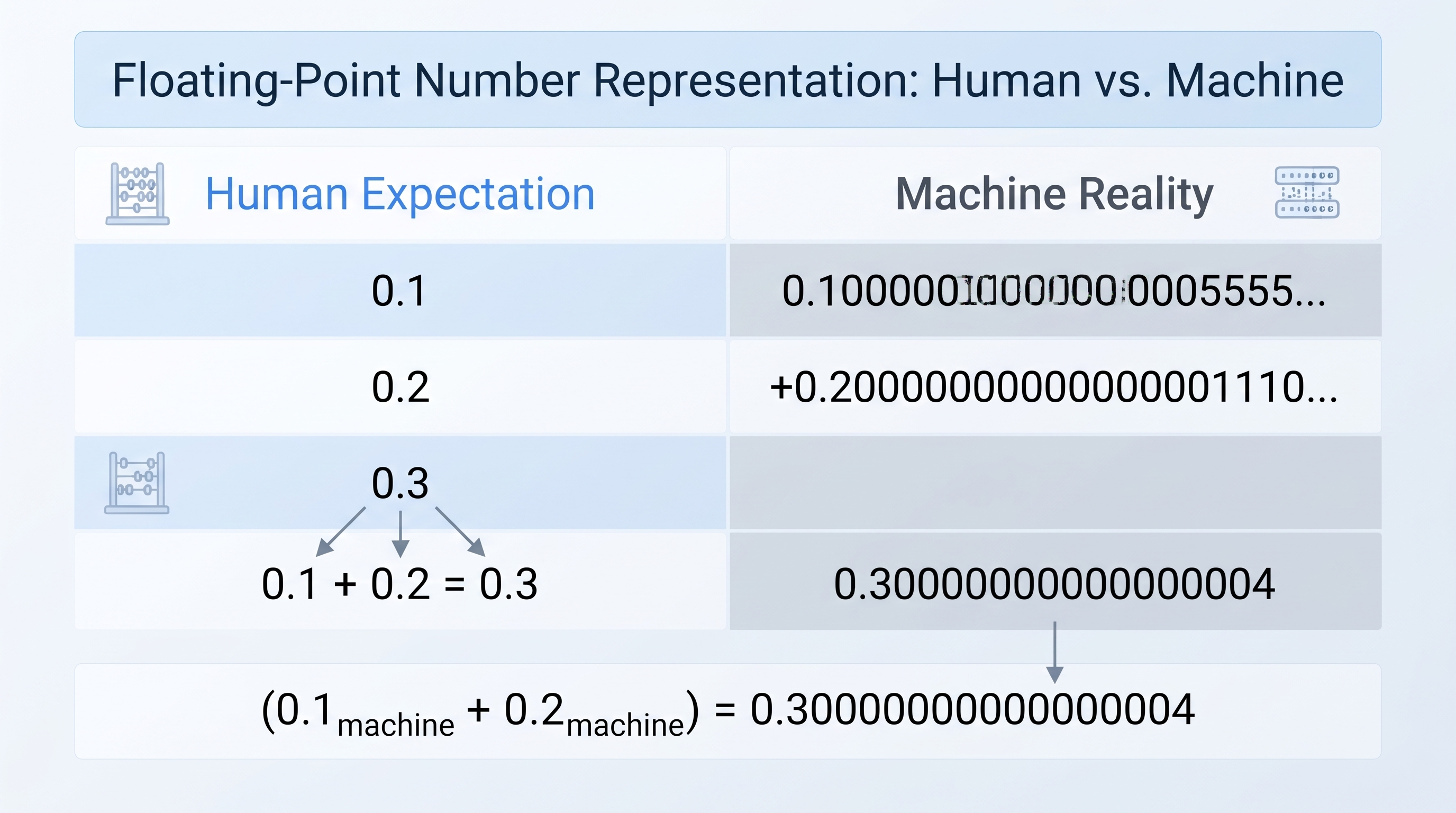
The same thing happens with 0.2.
When the computer adds these two approximations together, the tiny rounding errors combine, producing:
0.30000000000000004
The computer isn’t wrong.
It’s giving the most accurate answer possible using the numbers it actually stored.
A Simple Way to Visualize It
Imagine you want to write the value:
1 ÷ 3
on a piece of paper with room for only four decimal places.
You write:
0.3333
Now multiply it by 3:
0.3333 × 3 = 0.9999
Instead of exactly 1, you get:
0.9999
The same idea applies to floating-point numbers.
The computer stores a rounded version first.
Later calculations use those rounded values.
Converting 0.1 to Binary
One common way to convert decimals into binary is by repeatedly multiplying by 2.
0.1 × 2 = 0.2   → 0
0.2 × 2 = 0.4   → 0
0.4 × 2 = 0.8   → 0
0.8 × 2 = 1.6   → 1
0.6 × 2 = 1.2   → 1
0.2 × 2 = 0.4   → 0
At this point the sequence starts repeating forever.
The final binary expansion looks like:
0.000110011001100110011...
Notice how the pattern never stops.
Which Numbers Can Be Stored Exactly ?
Not every decimal causes problems.
Numbers whose denominator is a power of 2 have an exact binary representation.
| Decimal | Binary | Exact? |
|---|---|---|
| 0.5 | 0.1 | Yes |
| 0.25 | 0.01 | Yes |
| 0.75 | 0.11 | Yes |
| 0.125 | 0.001 | Yes |
| 0.1 | Infinite | No |
| 0.2 | Infinite | No |
| 0.3 | Infinite | No |
A simple rule to remember:
NOTE : If a fraction’s denominator is a power of two (2, 4, 8, 16, …), it can usually be stored exactly. Otherwise, the computer stores an approximation.
Code Examples
JavaScript
0.1 + 0.2
// 0.30000000000000004

0.1 + 0.2 === 0.3
// false
Python
0.1 + 0.2
# 0.30000000000000004

round(0.1 + 0.2, 1)
# 0.3
Java
System.out.println(0.1 + 0.2);

// 0.30000000000000004
Does This Matter in Real Applications?
Sometimes no.
Sometimes absolutely.
Financial Software
Banks can’t afford tiny rounding errors when processing millions of transactions.
Instead of storing ₹19.99 as a floating-point number, they usually store:
1999 paise
All calculations happen with integers, and the decimal point is added only when displaying the value.
Scientific Computing
In simulations involving millions of calculations, tiny floating-point errors can gradually accumulate.
Scientists often use specialized numerical methods to minimize these effects.
Game Development
Floating-point errors are usually small enough to ignore, but repeated calculations can slowly cause object positions to drift.
Game engines periodically correct these values.
User Interfaces
Most users never notice floating-point inaccuracies because applications round values before displaying them.
For example:
0.30000000000000004
is shown as:
0.30
How to Avoid Floating-Point Problems
1. Use Integers for Money
Instead of:
19.99 + 0.01
store:
1999 + 1 = 2000
Then divide by 100 when displaying the value.
This completely avoids binary floating-point issues.
2. Never Compare Floating-Point Numbers Directly
Instead of:
a === b
use:
Math.abs(a - b) < Number.EPSILON
This checks whether two numbers are “close enough.”
3. Use Decimal Libraries
Many languages provide decimal types designed for exact arithmetic.
Examples include:
- Python:
decimal.Decimal - Java:
BigDecimal - JavaScript:
decimal.jsorbig.js - C#:
decimal
These are especially useful for accounting and financial applications.
4. Round Values for Display
Users rarely need to see all 17 decimal places.
(0.1 + 0.2).toFixed(1)
Output:
0.3
Common Questions
Is this a bug in JavaScript?
No.
JavaScript follows the IEEE 754 standard, just like many other programming languages.
Does Python have the same issue?
Yes.
Python, Java, C++, Go, Rust, Swift, and many other languages behave the same way because they use binary floating-point arithmetic.
Are integers affected?
Generally, no.
Whole numbers within the safe integer range are stored exactly.
The issue mainly affects decimal fractions.
Why don’t computers use decimal instead of binary?
Modern processors are designed for binary arithmetic because it’s much faster and more efficient.
Decimal arithmetic exists, but it’s slower and mainly used where exact precision is essential, such as banking and finance.
How do banks avoid this problem?
Banks typically avoid floating-point numbers altogether.
They use integer-based calculations (such as storing amounts in cents or paise) or decimal data types that provide exact precision.
Key Takeaways
The unexpected result:
0.1 + 0.2 = 0.30000000000000004
isn’t a programming mistake.
It’s a natural consequence of representing decimal fractions using finite binary digits.
Remember these points:
- Computers store floating-point numbers in binary.
- Values like 0.1 and 0.2 cannot be represented exactly.
- They are rounded to the nearest possible binary value.
- Small rounding errors are normal.
- For financial software, use integers or decimal types instead of floating-point numbers.
Related Tools:
- IEEE 754 Floating-Point Converter
- Decimal to Binary Converter
- Binary to Decimal Converter
- Scientific Calculator
Understanding this concept is an important milestone for every programmer. Once you know why it happens, you’ll write more reliable code and avoid subtle bugs that can be difficult to track down.
Free tools
Learn faster with Numverto
Free number system converters, binary tools, EMI calculators, and more, with step-by-step working.
Written by

Mannu Kumar
Founder of Numverto. MCA graduate, full-stack developer, and lifelong learner who built this platform so every student gets the explanation, not just the answer.
Related tools
More from Numverto Blog
ieee754
IEEE 754 Floating Point Explained Sign, Exponent & Mantissa
Master IEEE 754 floating point format sign, exponent, mantissa explained with real conversion examples for exams and coding interviews.
13 July 2026
number systems
Number System Conversion Tricks and Shortcuts — BCA BTech Exam Guide
Quick tricks and shortcuts for binary, octal, decimal, and hexadecimal conversion for BCA/BTech exams. Memory tricks, quick reference tables, and common exam questions.
30 June 2026
Discussion