
Bits, Bytes, KB, MB, GB Computer Memory Units Explained
Understand computer memory units from bits to terabytes. Learn binary vs decimal prefixes, conversion formulas, and real-world storage examples.
Introduction
Every file on your computer, every photo on your phone, and every page you scroll through online comes down to the same thing: a long string of binary digits. If you’ve ever wondered why a “500 GB” drive shows up as 465 GB, or why your internet plan promises 100 Mbps but your download bar doesn’t move that fast, it all comes back to how we measure digital memory.
This guide walks through the full hierarchy of memory units from the humble bit all the way up to yottabytes clears up the age-old binary vs. decimal mix-up, and gives you real examples so the numbers actually mean something.
Quick Summary
- A bit is the smallest unit of data (0 or 1); 8 bits make 1 byte.
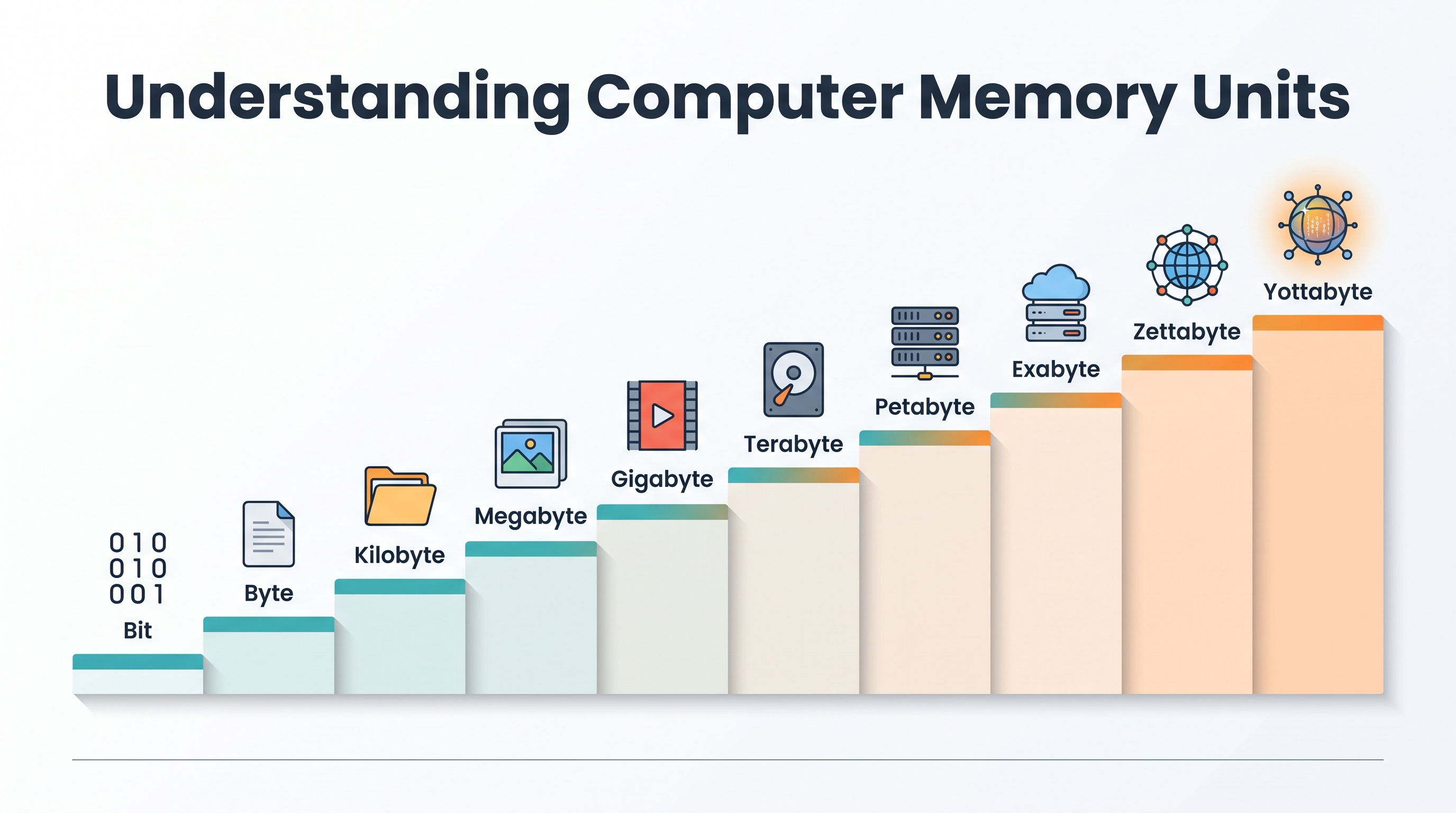
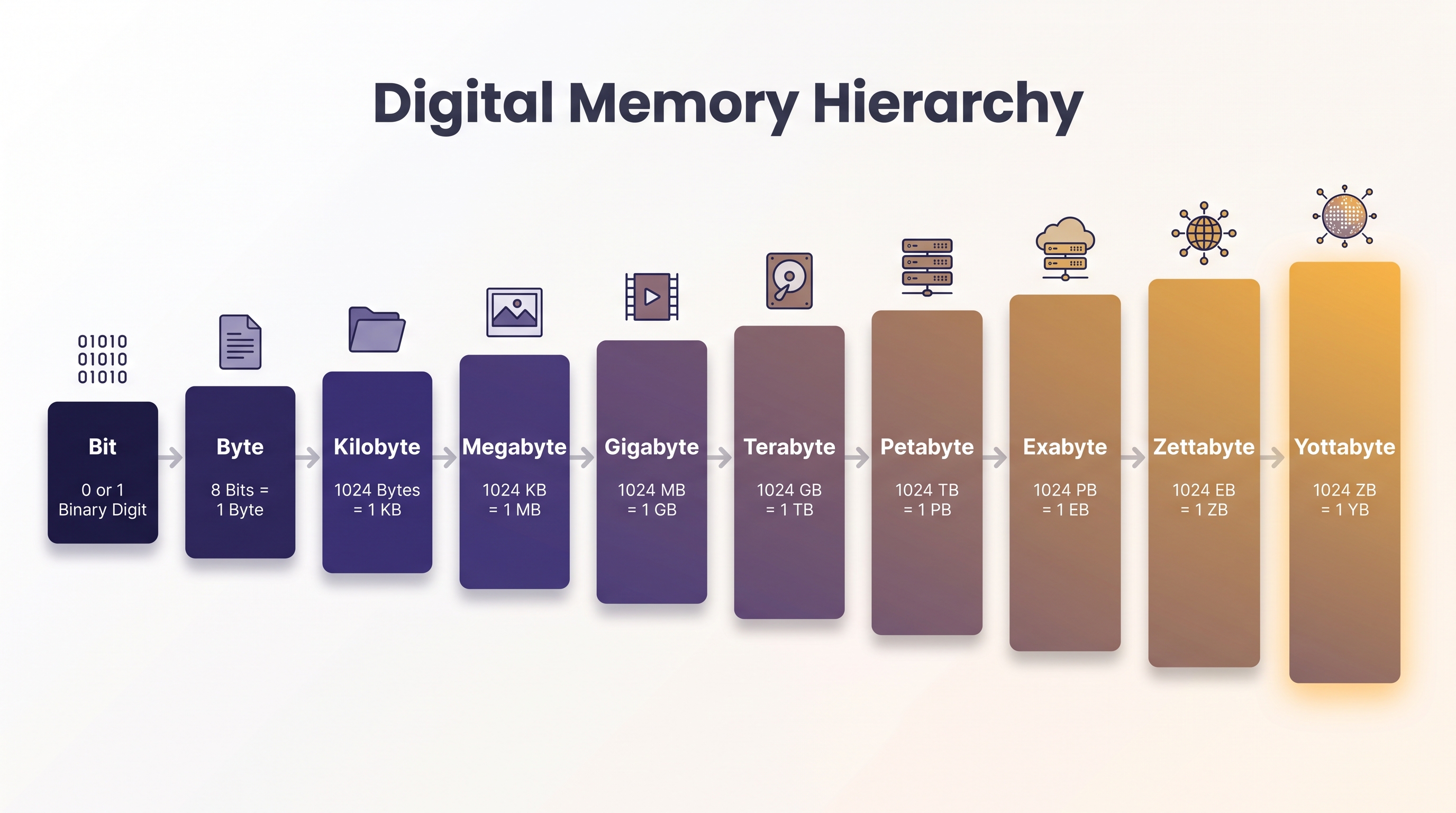
- Units scale up as KB → MB → GB → TB → PB → EB → ZB → YB.
- Computers count in binary (multiples of 1,024); manufacturers count in decimal (multiples of 1,000) that’s why your drive shows less space than advertised.
- Internet speed is measured in bits per second (Mbps); file size is measured in bytes (MB) divide Mbps by 8 to compare them.
- RAM is fast but temporary; storage is slower but permanent both are measured in the same units.
Why Memory Units Matter
You don’t need to be an engineer to benefit from understanding this topic. It affects real decisions: which phone storage tier to buy, whether your internet plan is actually fast enough for 4K streaming, why a “128 GB” phone never quite shows 128 GB free, and how to interpret spec sheets when comparing laptops or cloud storage plans. Once the units click, a lot of everyday tech confusion disappears you stop overpaying for storage you don’t need, and you stop being surprised by numbers that used to feel arbitrary.
The Bit Where It All Starts
A bit (short for binary digit) is the smallest possible unit of data: just a 0 or a 1. Think of it as a single light switch on or off, nothing in between. Every photo, song, and app you’ve ever used is built from billions of these tiny switches.
The Byte
Group 8 bits together and you get a byte enough combinations (2⁸ = 256) to represent one character, like the letter “A” or the number “7”. The byte is the practical building block of computing; almost every size you see quoted (KB, MB, GB) is really just a multiple of bytes, not raw bits.
Memory Hierarchy
Binary Units (Powers of 1024)
| Unit | Abbreviation | Size | Exact Value |
|---|---|---|---|
| Byte | B | 8 bits | 8 bits |
| Kilobyte | KB | 1,024 bytes | 2¹⁰ bytes |
| Megabyte | MB | 1,024 KB | 2²⁰ bytes |
| Gigabyte | GB | 1,024 MB | 2³⁰ bytes |
| Terabyte | TB | 1,024 GB | 2⁴⁰ bytes |
| Petabyte | PB | 1,024 TB | 2⁵⁰ bytes |
Decimal Units (Powers of 1000)
Hard drive makers and internet providers count in round decimal numbers instead:
| Unit | Size (decimal) | Difference from binary |
|---|---|---|
| 1 KB (SI) | 1,000 bytes | 2.4% less than binary KB |
| 1 MB (SI) | 1,000,000 bytes | 4.9% less |
| 1 GB (SI) | 1,000,000,000 bytes | 7.4% less |
| 1 TB (SI) | 1,000,000,000,000 bytes | 9.9% less |
Binary vs Decimal
For decades, computer scientists used KB, MB, and GB to mean binary (1024-based) values, while storage manufacturers used the exact same letters to mean decimal (1000-based) values. To untangle this, the IEC introduced separate binary-only terms:
| Binary (IEC) | Symbol | Decimal (SI) | Symbol |
|---|---|---|---|
| Kibibyte | KiB | Kilobyte | KB |
| Mebibyte | MiB | Megabyte | MB |
| Gibibyte | GiB | Gigabyte | GB |
| Tebibyte | TiB | Terabyte | TB |
In theory, “KiB” should have solved the problem. In practice, almost nobody uses it most people still just say “GB” and let context sort out the meaning.
Why Windows Shows Less Storage
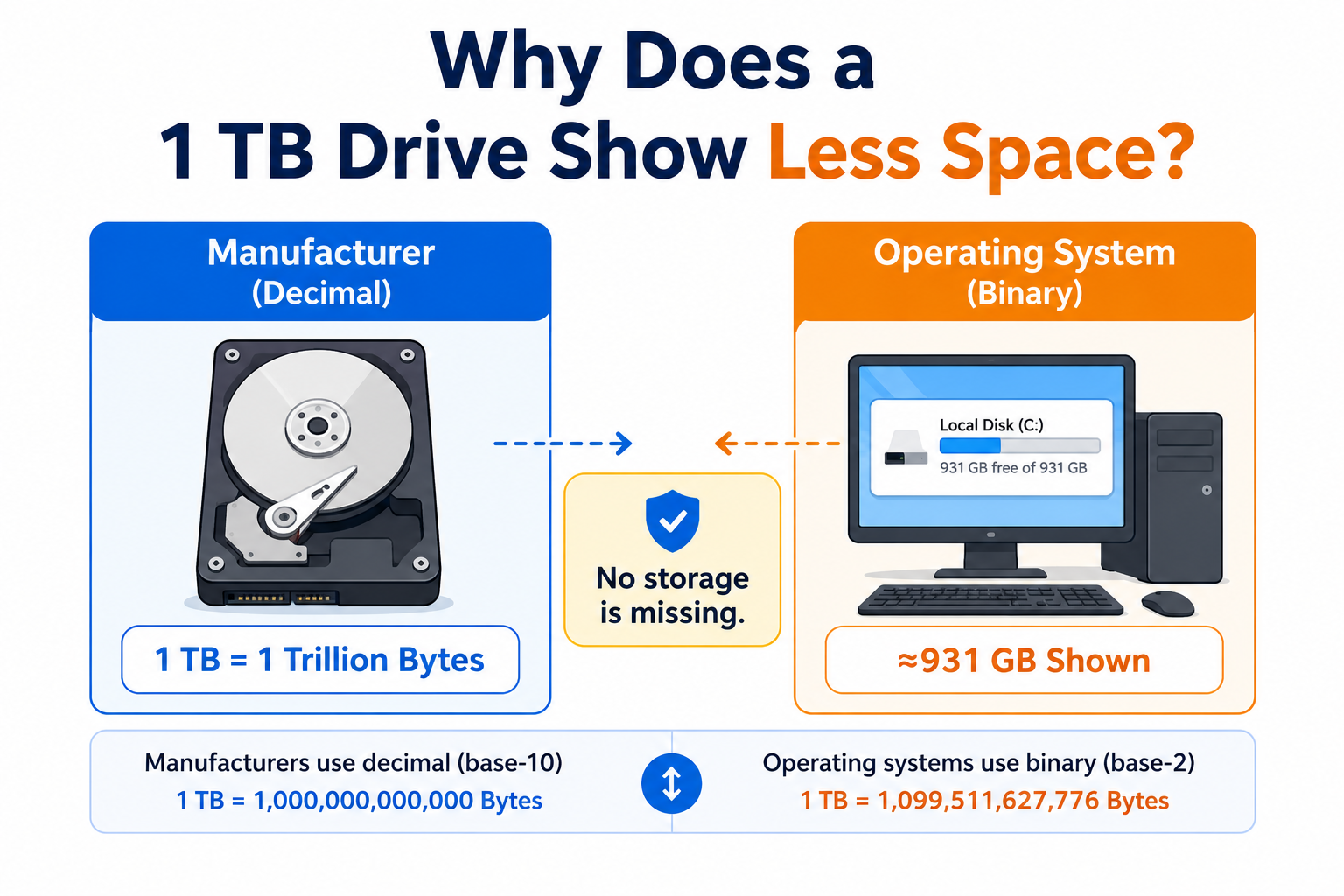
This is the single most common real-world confusion around memory units. When you buy a drive labeled “1 TB,” the manufacturer means exactly 1,000,000,000,000 bytes a clean decimal terabyte. But Windows (and most operating systems) calculate storage using binary math, dividing that same byte count by 1,024 three times over to express it in GB. The result lands at about 931 GB, not 1,000.
Nothing is missing and no space has been secretly used up it’s purely a labeling difference between decimal marketing and binary display. Interestingly, modern macOS actually reports storage in decimal GB (matching manufacturers), so the exact same physical drive can show a different number depending on whether you check it on a Mac or a Windows PC.
Conversion Formulas
- Bits → Bytes: divide by 8
- Bytes → KB: divide by 1024 (binary) or 1000 (decimal)
- KB → MB: divide by 1024
- MB → GB: divide by 1024
Worked Examples
Example 1: How many bytes in 4 GB?
- 4 GB (binary) = 4 × 1024 × 1024 × 1024 = 4,294,967,296 bytes
- 4 GB (decimal) = 4 × 1000 × 1000 × 1000 = 4,000,000,000 bytes
Example 2: How many MB in 2.5 GB?
- 2.5 GB × 1024 = 2,560 MB
Example 3: How long to download a 500 MB file on a 50 Mbps connection?
- 50 Mbps ÷ 8 = 6.25 MB/s
- 500 MB ÷ 6.25 MB/s = 80 seconds
Real-Life Storage Examples
| Item | Approximate Size |
|---|---|
| One character (ASCII) | 1 byte |
| One page of text | ~2 KB |
| MP3 song (4 min) | ~4 MB |
| Smartphone photo | ~3–5 MB |
| HD movie (2 hrs) | ~4–5 GB |
| Windows 11 (minimum recommended drive) | 64 GB |
| Modern consumer SSD | 512 GB – 8 TB |
| Enterprise/data center SSD | up to 100+ TB |
A quick clarification on Windows 11: Microsoft lists 64 GB as the minimum drive size to install it on, not the actual space the OS takes up day-to-day after installation and updates, Windows itself typically uses somewhere in the 20–30 GB range.
Network Speed vs File Size
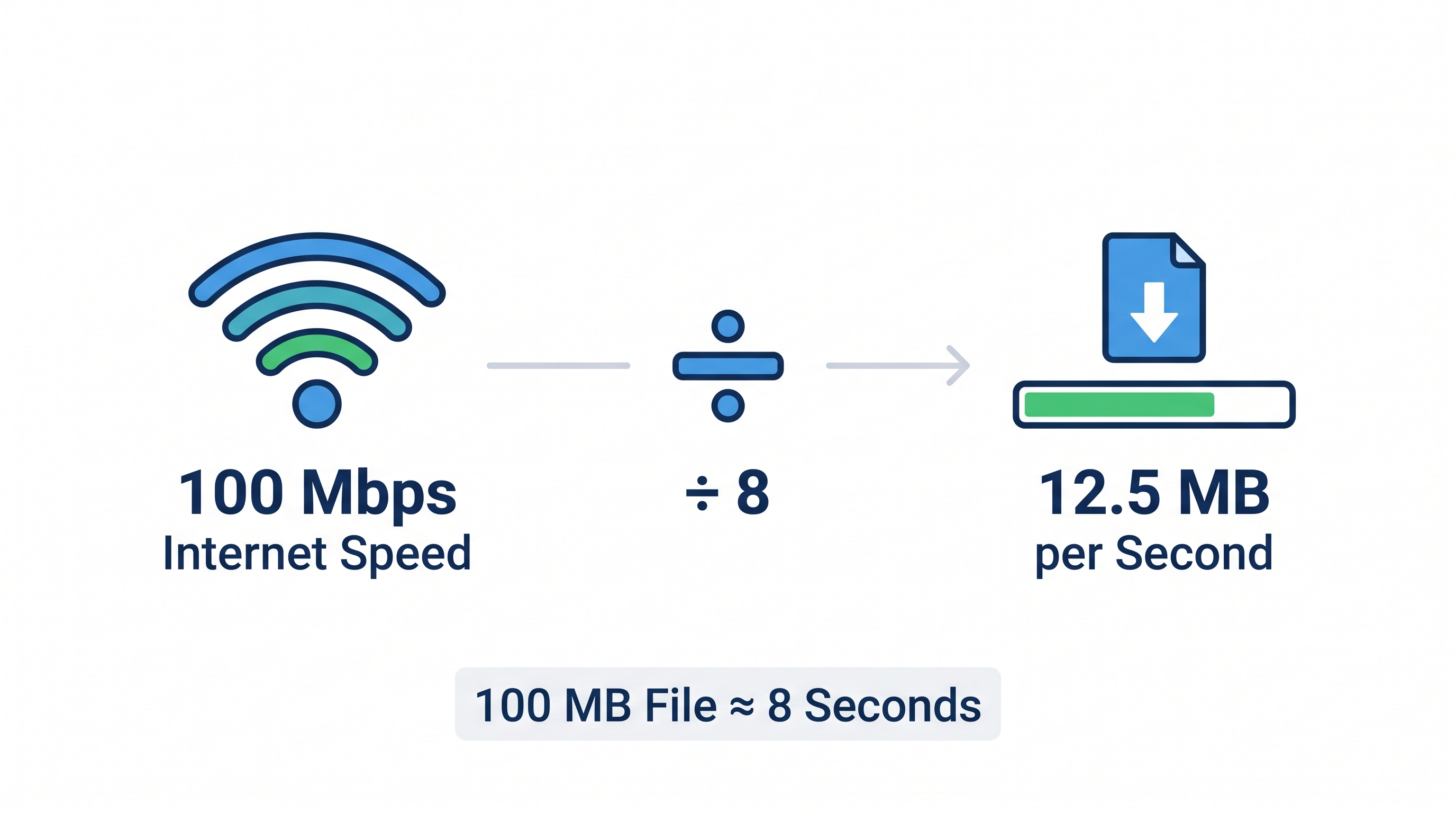
Internet speeds are almost always advertised in bits per second (Mbps, Gbps) not bytes. This trips people up constantly.
- A 100 Mbps connection = 100 megabits/second ≈ 12.5 MB/second
- To convert: divide Mbps by 8 to get your real-world MB/s
So downloading a 100 MB file on a “100 Mbps” plan takes roughly 8 seconds not 1 second, even though the numbers look similar. And with home fiber connections now commonly advertised at 1 Gbps or higher, the same division rule still applies: 1 Gbps ÷ 8 ≈ 125 MB/s of real transfer speed.
RAM vs Storage
RAM and storage are both measured in bytes, but they serve completely different jobs. RAM (Random Access Memory) is volatile it holds data only while the device is powered on, and clears the moment you shut down. In exchange for that impermanence, it’s extremely fast, which is why more RAM helps your device multitask smoothly. Storage (an SSD or HDD) is non-volatile it keeps your files, photos, and apps permanently, even after a shutdown, but reads and writes data more slowly than RAM. A simple way to remember it: RAM is short-term memory, storage is long-term memory.
Largest Memory Units (EB, ZB, YB)
Beyond petabytes, the ladder keeps climbing these units are now genuinely relevant thanks to global cloud storage and AI data infrastructure:
| Unit | Abbreviation | Size |
|---|---|---|
| Exabyte | EB | 1,024 PB |
| Zettabyte | ZB | 1,024 EB |
| Yottabyte | YB | 1,024 ZB |
To put this in perspective, the entire internet’s data traffic is estimated in zettabytes annually, and a single yottabyte is so large that no storage system in the world currently holds anywhere close to one.
Buying Guide: How Much Storage Do You Actually Need?
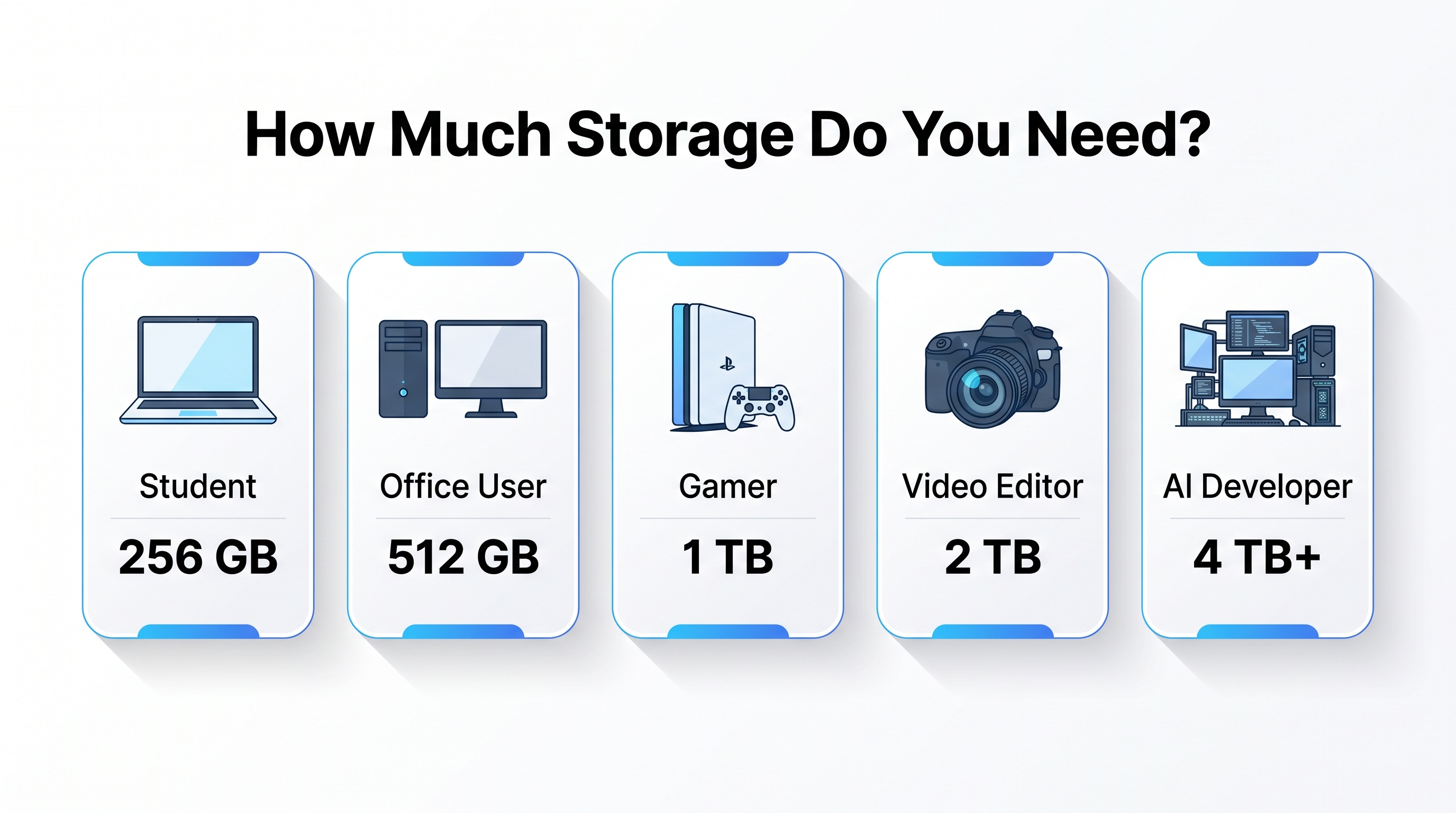
- 32–64 GB: Fine for a basic phone with light app and photo use, or a budget Chromebook-style laptop.
- 128–256 GB: A comfortable sweet spot for most smartphone users and everyday laptops.
- 512 GB – 1 TB: Good for people who game, edit photos/video, or keep a large offline media library.
- 2 TB and above: Best suited for video editors, developers with large project files, or anyone running local AI models or large datasets.
A practical tip: always budget for less “usable” space than the label promises, since the OS, system files, and binary-vs-decimal differences will always eat into the advertised number.
Common Mistakes to Avoid
- Mixing up bits and bytes — a byte is 8 times bigger than a bit, so the difference matters.
- Assuming 1000 always equals 1024 — your OS likely uses binary, your hard drive box uses decimal.
- Reading Mbps as MB/s — divide by 8 before you get excited about download times.
- Expecting “free space” to match the label exactly — system files and formatting always eat into it a little.
Practice Questions
- How many bytes are in 2 KB (binary)?
- Convert 3,072 MB into GB.
- A file is 250 MB. How long will it take to download on a 40 Mbps connection?
- Which is bigger: 1 TB or 1,000,000 MB? Why?
- Why does a “256 GB” phone usually show less than 256 GB of free space out of the box?
(Answers: 1. 2,048 bytes 2. 3 GB 3. 50 seconds 4. They’re equal in decimal terms, but 1 TB in binary is actually 1,048,576 MB, so binary TB is larger 5. Because of binary-vs-decimal rounding plus space used by the OS and pre-installed system files)
Interview Questions
- Explain the difference between a bit and a byte.
- Why is 1 KB equal to 1,024 bytes in computing, but 1,000 bytes in storage marketing?
- What are KiB, MiB, and GiB, and why were they introduced?
- How would you convert a network speed in Mbps into an expected file download time in seconds?
- What’s the practical difference between RAM and storage from a systems design perspective?
Frequently Asked Questions
Why is 1 KB equal to 1024 bytes and not 1000?
Because computers think in binary (base 2), and 2¹⁰ = 1024 is the power of 2 closest to a clean 1000. Memory is naturally organized this way at the hardware level.
How many bytes are in 1 GB?
In binary: 1,073,741,824 bytes (1024³). In decimal: 1,000,000,000 bytes (1000³). Which one your device shows depends on the operating system and context.
Why does my 1 TB drive only show 931 GB?
The manufacturer counts in decimal (1 TB = 1,000,000,000,000 bytes), while your OS often displays in binary (÷ 1024³ = 931.3 GiB). No space has vanished it’s just a different counting system.
What’s the actual difference between RAM and storage?
RAM is volatile it clears the moment you power off, but it’s very fast. Storage (your SSD or HDD) is non-volatile, so it holds onto your files permanently, though it’s slower to read and write.
How much data does a WhatsApp message actually use?
A plain text message: roughly 1–2 KB. A compressed photo message: 100–500 KB. A voice note: about 5–15 KB for every second of audio.
Related Tools
Related Articles
- How to Convert Binary to Decimal Step by Step
- Binary Number System Explained
- What is a Number System?
Conclusion
Memory units might look like dry technical trivia at first, but they explain some genuinely useful everyday realities why your drive never shows the full number on the box, why downloads take longer than the advertised speed suggests, and how much storage you actually need before you buy. Once you understand that computers count in powers of two while manufacturers count in clean round numbers, the confusing parts of digital storage stop being confusing at all and you’re equipped to make smarter decisions the next time you’re comparing devices, plans, or drives.
Free tools
Learn faster with Numverto
Free number system converters, binary tools, EMI calculators, and more, with step-by-step working.
Written by

Mannu Kumar
Founder of Numverto. MCA graduate, full-stack developer, and lifelong learner who built this platform so every student gets the explanation, not just the answer.
Related tools
More from Numverto Blog
ieee754
IEEE 754 Floating Point Explained Sign, Exponent & Mantissa
Master IEEE 754 floating point format sign, exponent, mantissa explained with real conversion examples for exams and coding interviews.
13 July 2026
IEEE 754 Standard
Why Does 0.1 + 0.2 Equal 0.30000000000000004? Floating-Point Errors Explained
Understand why computers produce floating-point precision errors, how the IEEE 754 standard stores decimal numbers in binary, why rounding occurs, and the best practices developers use to write accurate, reliable code.
1 July 2026
Discussion