
Hexadecimal Color Codes in Web Design Complete Guide
Learn how hex color codes work in CSS and web design. Understand RGB to hex conversion, color code formats (#RGB, #RRGGBB), and a complete reference table.
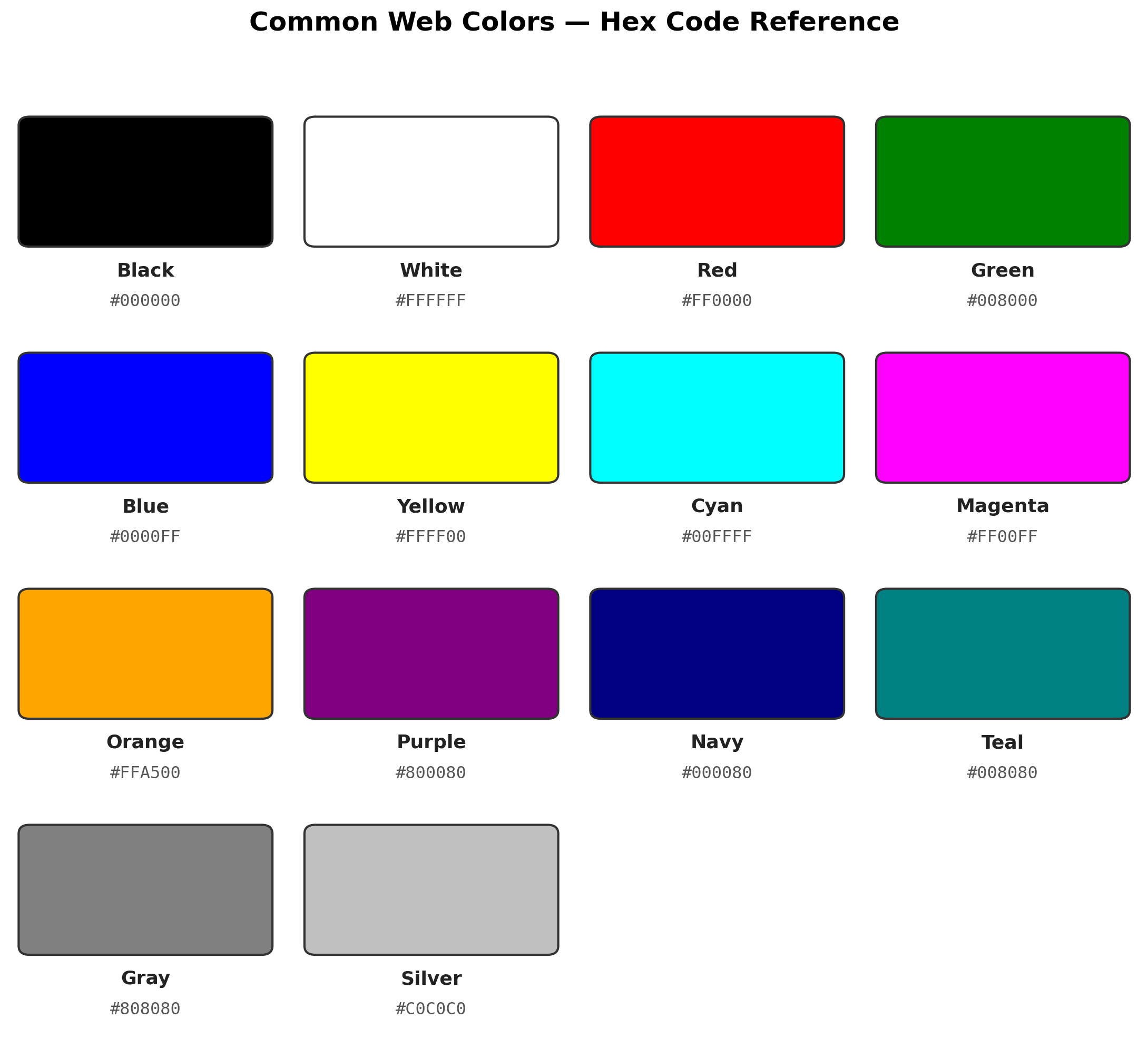
Table of Contents
- What Are Hex Color Codes?
- Key Concepts
- Common Web Colors Reference
- How RGB Maps to Hex
- Worked Conversion Examples
- Shorthand Notation
- Alpha Transparency
- Using Hex in CSS
- Hex vs RGB vs HSL
- Common Mistakes
- Tools to Find Any Hex Code
- Practice Questions
- FAQ
Introduction
Open the CSS file of almost any website and you’ll see them everywhere: short strings like #0D1B2A or #FFF tucked into background-color and color properties. These are hex color codes, and they’re the most common way colors get defined across the web used in CSS, HTML attributes, and virtually every design tool from Figma to Photoshop.
This guide breaks down exactly how hex codes work, how they map back to the RGB values you might already be familiar with, and covers the shorthand and transparency tricks that make them so convenient for developers and designers alike.
Definition
A hex color code is a six-digit (or three-digit shorthand) hexadecimal representation of a color’s Red, Green, and Blue intensity values, written as
#RRGGBB, where each pair of digits ranges from00toFF(0–255 in decimal).
Quick Summary (TL;DR)
- Hex codes represent color using base-16 notation:
#RRGGBB, where each pair is one color channel (Red, Green, Blue). - Each channel ranges from
00(no light) toFF(full intensity, equal to 255 in decimal). - Shorthand
#RGBonly works when both digits in each pair match (e.g.,#F0F=#FF00FF). - CSS also supports 8-digit hex codes (
#RRGGBBAA) where the last pair controls transparency. - Hex is preferred over
rgb()mainly because it’s shorter and easier to copy-paste, not because it’s technically superior.
Why This Matters
If you write any CSS, work with a design tool, or build UI components, you’ll run into hex codes constantly in Figma exports, Tailwind configs, brand style guides, and browser DevTools. Understanding what those six characters actually mean (rather than just copy-pasting them) makes it much easier to tweak a color slightly, debug why something looks “off,” or convert between formats when a design tool gives you RGB but your code needs hex.
What Are Hex Color Codes?
Every color you see on a screen is built from a mix of Red, Green, and Blue light this is how monitors, phones, and displays physically work. Hex color codes are simply a compact way to write those three RGB values using hexadecimal (base-16) notation, and they’ve become the de facto standard across CSS, HTML, and design software worldwide.
Convert hex values instantly: Number System Converter — switch between decimal, hex, binary, and octal in one click.
A hex color code always starts with #, followed by 6 characters (or 3 in shorthand form), where each pair represents one color channel:
#RRGGBB
 ↑  ↑  ↑
 Red Green Blue
Each channel ranges from 00 (0 intensity) to FF (255, full intensity).

Key Concepts You Need First
| Term | Meaning |
|---|---|
| Hexadecimal (base-16) | A number system using digits 0-9 and letters A-F to represent values 0-15 |
| Channel | One of the three color components — Red, Green, or Blue |
| Intensity | How strong that channel’s contribution is, from 0 (none) to 255 (maximum) |
| Shorthand hex | A 3-character version used when both digits in each pair are identical |
| Alpha channel | An optional 4th pair controlling transparency in 8-digit hex codes |
Common Web Colors Reference
| Color | Hex Code | R | G | B |
|---|---|---|---|---|
| Black | #000000 | 0 | 0 | 0 |
| White | #FFFFFF | 255 | 255 | 255 |
| Red | #FF0000 | 255 | 0 | 0 |
| Green | #008000 | 0 | 128 | 0 |
| Blue | #0000FF | 0 | 0 | 255 |
| Yellow | #FFFF00 | 255 | 255 | 0 |
| Cyan | #00FFFF | 0 | 255 | 255 |
| Magenta | #FF00FF | 255 | 0 | 255 |
| Orange | #FFA500 | 255 | 165 | 0 |
| Purple | #800080 | 128 | 0 | 128 |
| Navy | #000080 | 0 | 0 | 128 |
| Teal | #008080 | 0 | 128 | 128 |
| Gray | #808080 | 128 | 128 | 128 |
| Silver | #C0C0C0 | 192 | 192 | 192 |
How RGB Maps to Hexadecimal
Each RGB value (0–255 in decimal) converts to a 2-digit hex number (00–FF):
- Decimal
0→ Hex00(no light) - Decimal
128→ Hex80(half intensity) - Decimal
255→ HexFF(full intensity)
Conversion Examples, Step by Step
Example 1: RGB(66, 135, 245) → Hex
- R = 66 → 66 ÷ 16 = 4 remainder 2 →
42 - G = 135 → 135 ÷ 16 = 8 remainder 7 →
87 - B = 245 → 245 ÷ 16 = 15 remainder 5 →
F5
Result: #4287F5 (a shade commonly known as “Google Blue”)
Example 2: RGB(255, 165, 0) → Hex
- R: 255 ÷ 16 = 15 remainder 15 →
FF - G: 165 ÷ 16 = 10 remainder 5 →
A5 - B: 0 ÷ 16 = 0 remainder 0 →
00
Answer: #FFA500 (Orange)
Use the Hex to Decimal Converter to verify any conversion yourself.
How to Convert RGB to Hex Manually
- Step 1: Take each RGB value (0–255)
- Step 2: Divide by 16, and note the quotient and remainder
- Step 3: Convert the quotient and remainder into hex digits (where 10=A, 11=B, … 15=F)
- Step 4: Combine as
#+ R hex + G hex + B hex
Shorthand Hex Notation
When both digits in each pair are the same, you can use the shorter 3-character shorthand:
| Shorthand | Expands To | Color |
|---|---|---|
| #FFF | #FFFFFF | White |
| #000 | #000000 | Black |
| #F00 | #FF0000 | Red |
| #0F0 | #00FF00 | Lime |
| #00F | #0000FF | Blue |
| #FC0 | #FFCC00 | Gold |
#ABC expands to #AABBCC - each digit is simply doubled.
Hex Opacity (Alpha Channel)
Modern CSS supports 8-digit hex codes, where the last 2 digits control transparency:
| Opacity % | Hex Suffix | Example |
|---|---|---|
| 100% | FF | #000000FF |
| 90% | E6 | #000000E6 |
| 75% | BF | #000000BF |
| 50% | 80 | #00000080 |
| 25% | 40 | #00000040 |
| 10% | 1A | #0000001A |
| 0% | 00 | #00000000 |
This is functionally equivalent to using rgba(), just more compact directly inside a hex string.
Using Hex Colors in CSS
/* Standard 6-digit hex */
.header { background-color: #0D1B2A; }

/* Shorthand */
.text { color: #FFF; }

/* 8-digit hex with alpha */
.overlay { background: #00000080; } /* 50% black */
Hex vs RGB vs HSL
| Format | Example | Best For | Limitation |
|---|---|---|---|
| Hex | #FF5733 | Compact, copy-paste friendly, universal support | Not intuitive to read or reason about |
| RGB | rgb(255, 87, 51) | Explicit channel values, easy to understand | More verbose to type |
| HSL | hsl(11, 100%, 60%) | Intuitive adjustments (hue, saturation, lightness) | Less universally used in exported design assets |
The rule of thumb: use hex for final CSS values and quick copy-pasting, but reach for HSL when you need to intuitively adjust a color’s brightness or saturation without recalculating RGB channels.
Why Designers Use Hex
- Compact: 7 characters vs.
rgb(255, 165, 0)at 16 characters - Copy-paste friendly: No spaces or parentheses to worry about
- Universal: Works in CSS, HTML attributes, and design tools like Figma and Photoshop
- Easy to tweak: Changing a single hex digit adjusts the color slightly, which is useful for fine control
Common Mistakes
- Forgetting the
#prefix — a loneFF5733isn’t valid CSS; it needs the leading#. - Using shorthand incorrectly —
#F5Aonly expands correctly when the person meant#FF55AA; if the intended color doesn’t have matching digit pairs, shorthand can’t represent it. - Confusing hex opacity with hex brightness — the last two digits in an 8-digit hex code control transparency, not how “light” or “dark” the color looks.
- Assuming hex and RGB give different colors — they don’t; hex is just another way of writing the exact same RGB values, so converting between them never changes the actual color.
- Mixing up letter case — hex codes are case-insensitive (
#fffand#FFFrender identically), so inconsistency here is a style issue, not a bug.
Tools to Find Any Color’s Hex Code
- Browser DevTools — most browsers include a built-in color picker when inspecting an element’s CSS
- ColorZilla (browser extension) — lets you pick a color from anywhere on a webpage
- macOS Digital Color Meter — a built-in utility for reading the exact color of any pixel on screen
- Windows PowerToys Color Picker — a free Microsoft utility for grabbing hex/RGB values from anywhere on your screen
Practice Questions
- Convert RGB(0, 200, 100) to a 6-digit hex code.
- What does the shorthand
#3A9expand to in full 6-digit form? - What hex suffix would you add to
#FF0000to make it 25% opaque? - Is
#00ff00the same color as#00FF00? Why or why not? - Why can’t the color RGB(120, 45, 200) be represented using 3-character shorthand?
(Answers: 1. #00C864 2. #33AA99 3. #FF000040 4. Yes, hex codes are case-insensitive, so both represent identical values 5. Because none of the channel pairs have matching digits (120→78, 45→2D, 200→C8 — no repeated digit pairs), so shorthand can’t compress it)
Frequently Asked Questions
Why do color codes use hexadecimal instead of decimal?
Hex is base-16, so exactly 2 digits can represent all 256 possible values (0–255) needed per color channel. Decimal would require 3 digits for the same range, making codes noticeably longer.
What is the difference between #RGB and #RRGGBB?
#RGB is shorthand notation where each digit is simply doubled to form the full code #F0F becomes #FF00FF. It only works when both digits in each channel pair happen to be identical.
Can I use hex colors in React or Tailwind CSS?
Yes. In Tailwind, you can use an arbitrary value like bg-[#FF5733] or define custom colors directly in your config file. In React inline styles, you’d write style={{color: '#FF5733'}}.
What hex code represents fully transparent?
#00000000 (using the 8-digit alpha format) or simply the CSS transparent keyword. The final two digits, 00, indicate 0% opacity.
How do I find the hex code of any color on my screen?
Use your browser’s built-in DevTools color picker, a browser extension like ColorZilla, macOS’s Digital Color Meter, or Windows PowerToys Color Picker all let you sample any pixel and instantly get its hex value.
Conclusion
Hex color codes might look cryptic at first glance, but they’re really just a compact, standardized way of writing the same RGB values you already understand split into three two-digit hexadecimal pairs. Once you know how the conversion works, reading and tweaking hex codes in a stylesheet stops being guesswork, and picking up shorthand notation or alpha transparency becomes second nature the next time you’re fine-tuning a design.
Related Tools
Related Articles
💬 Comments section enabled below.
Free tools
Learn faster with Numverto
Free number system converters, binary tools, EMI calculators, and more, with step-by-step working.
Written by

Numverto Editorial Team
Founder of Numverto. MCA graduate, full-stack developer, and lifelong learner who built this platform so every student gets the explanation, not just the answer.
Related tools
More from Numverto Blog
IEEE 754 Standard
Why Does 0.1 + 0.2 Equal 0.30000000000000004? Floating-Point Errors Explained
Understand why computers produce floating-point precision errors, how the IEEE 754 standard stores decimal numbers in binary, why rounding occurs, and the best practices developers use to write accurate, reliable code.
1 July 2026
hexadecimal
Hexadecimal (Hex) क्या है — आसान भाषा में समझें
Hexadecimal number system की पूरी जानकारी हिंदी में। Hex क्या है, 0-9 और A-F क्यों use होते हैं, decimal और binary से कैसे convert करें।
25 June 2026
Discussion